
Semantic tracing: how ARIA unlocks debugging, testing, and AI reasoning
AI writes more code than ever. With semantic traces — enriched by ARIA labels — developers, testers, and AIs see exactly what that code does at runtime.
AI tools are writing more code than ever, and that code is a liability. The more you ship, the more you need to know: did our change break something? What exactly happens when a user clicks that button? For reactive web apps, these questions are especially hard. A dropdown selection triggers an API call, which fills a table, which updates a chart. The chain of cause and effect is invisible unless you instrument it. And the tests that catch regressions in these flows? Traditionally you write them by hand, one brittle CSS selector at a time.
XMLUI takes a different approach. The framework emits semantic traces — structured records of what happened at the level of user intentions and system responses, not low-level DOM events. And the key that makes these traces readable, testable, and AI-friendly is something that already exists in every well-built web app: ARIA labels.
ARIA (Accessible Rich Internet Applications) attributes were designed to help screen readers describe UI elements to visually impaired users. It turns out those same labels are exactly what developers need to read a trace, what AI needs to reason about behavior, and what test frameworks need to generate robust selectors. Accessibility advocates like to say that curb cuts benefit everyone. Here that's especially true.
One attribute to serve them all
The same aria-label that makes an app accessible simultaneously serves:
-
The developer debugging an app. See in a single visualization — button clicked, API called, data changed — what would otherwise be spread across browser devtools panes.
-
An AI reasoning about behavior. Given a semantic trace, Claude says "I can see exactly what's going on" because the trace speaks the same language the developer used in markup.
-
An end user who encounters a problem. Show the semantic trace to the developer — it's a readable narrative, not a stack dump.
-
A company running regression tests. Tests work at the semantic level: Button clicked, API called, data changed (or didn't). No hand-written test code required.
-
A business stakeholder reviewing an app. Unlike a vibe-coded React app where AI-written code is opaque to non-specialists, XMLUI markup is simple enough to read and understand, with observability tools that make the runtime behavior transparent.
See it in action
Here's a small XMLUI app that queries the London Tube API. A dropdown selects a tube line, a data source fetches stations for that line, and a table displays the results.
<Component name="LondonTubeTab">
  <VStack>
    <H1>London Tube</H1>

    <Select id="lines" aria-label="Tube line" initialValue="bakerloo">
      <Items data="https://api.tfl.gov.uk/line/mode/tube/status">
        <Option value="{$item.id}" label="{$item.name}" />
      </Items>
    </Select>

    <DataSource
      id="stations"
      url="https://api.tfl.gov.uk/Line/{lines.value}/Route/Sequence/inbound"
      when="{!!lines.value}"
      resultSelector="stations"/>

    <Table data="{stations}" height="200px">
      <Column bindTo="name" />
      <Column bindTo="modes" />
    </Table>
  </VStack>
</Component>
Choosing "Piccadilly" from the dropdown triggers an API call; when it completes, the table refills with stations. This is a reactive chain — and the semantic trace captures the whole thing:
| # | Action | Target | Details |
|---|---|---|---|
| 1 | click | tab "LondonTube" | Switch to LondonTube tab |
| 2 | click | option "Hammersmith & City" (Select "Tube line") | GET /Line/hammersmith-city, Table: up |
| 3 | click | option "Piccadilly" (Select "Tube line") | GET /Line/piccadilly, Table: up |
You can visit a live instance of the app, take that journey, and click the Inspector icon to see a visualization of the traces.
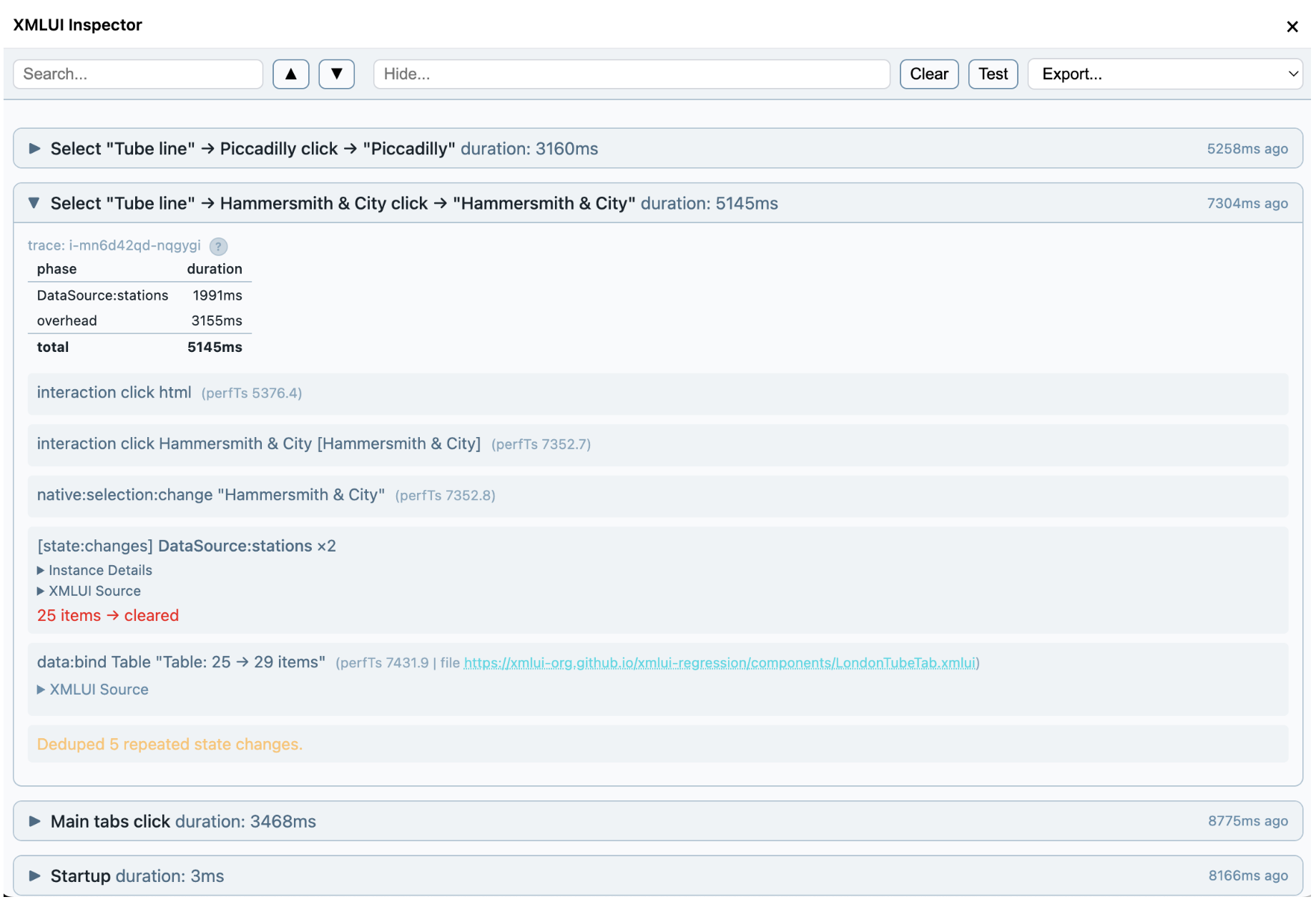
Every entry names the component (Select) and adds context with an ARIA label (Tube Line) — not a CSS class or a generated ID, but the human-readable name that also serves the screen reader. That's what makes the trace self-describing.
From traces to tests, automatically
The trace-tools kit includes a distiller that converts raw traces into structured steps — the ARIA target, the API calls to await, the data bindings to verify — and a generator that produces Playwright tests from those steps.
// Step 0: click the LondonTube tab
const tubeListResponse = page.waitForResponse(r =>
  r.url().includes('/line/mode/tube/status'));
await page.getByRole('tab', { name: 'LondonTube', exact: true }).click();
const tubeLines = await (await tubeListResponse).json();
expect(tubeLines.length).toBeGreaterThan(0);
expect(Object.keys(tubeLines[0]).sort()).toEqual(
  ['$type','created','crowding','disruptions','id',
   'lineStatuses','modeName','modified','name',
   'routeSections','serviceTypes']);

// Step 1: select Hammersmith & City from the "Tube line" dropdown
const hammersmithResponse = page.waitForResponse(r =>
  r.url().includes('/Line/hammersmith-city/Route/Sequence/inbound'));
await page.getByRole('combobox', { name: 'Tube line' }).click();
await page.getByRole('option', { name: 'Hammersmith & City', exact: true }).click();
const hammersmithRoute = await (await hammersmithResponse).json();
expect(Object.keys(hammersmithRoute).sort()).toEqual(
  ['$type','direction','isOutboundOnly','lineId','lineName',
   'lineStrings','mode','orderedLineRoutes','stations',
   'stopPointSequences']);
Notice the selectors: getByRole('tab', { name: 'LondonTube' }), getByRole('combobox', { name: 'Tube line' }). These come straight from the ARIA labels in the markup. No fragile CSS selectors, no generated test IDs. The tests assert the shape of API responses and the direction of data changes, not hardcoded values — so they stay valid as data evolves.
The trace-tools kit also includes a comparer that captures a fresh trace during a test and matches it semantically against the baseline.
Before (baseline):                    After (replay):
  APIs:                                 APIs:
    GET /Line/hammersmith-city ✓          GET /Line/hammersmith-city ✓
    GET /Line/piccadilly ✓                GET /Line/piccadilly ✓
  Mutations: (none) ✓                   Mutations: (none) ✓
  Data binds:                           Data binds:
    Table: up (25→29 rows) ✓              Table: up (25→29 rows) ✓
    Table: up (29→53 rows) ✓              Table: up (29→53 rows) ✓

SEMANTIC: PASS
When something breaks, the diff tells you exactly what changed:
  Before (baseline):                    After (replay):
    APIs:                                 APIs:
      GET /Line/hammersmith-city            GET /Line/hammersmith-city
      GET /Line/piccadilly                  ✗ missing
    Data binds:                           Data binds:
      Table: up (25→29 rows) ✓              Table: up (25→29 rows) ✓
      Table: up                             ✗ missing

  SEMANTIC: FAIL — Behavioral regression detected
    apis_missing_gets: GET /Line/piccadilly in baseline but not replay
    data_bind_count: expected 2, got 1
You can see the tests running continuously in a GitHub Action.
How ARIA labels flow automatically
None of this requires extra work from app developers. Every XMLUI component resolves its ARIA label automatically through a cascade, so traces and tests get meaningful names without anyone having to think about it.
The cascade works from the bottom up. At the base, component authors set static defaults in metadata. A Spinner gets "Loading", a ToneChangerButton gets "Toggle color mode". Every instance of that component inherits the label automatically.
Next, wrapper authors can derive labels from existing props. An Avatar with name="Alice" gets "Alice" as its label. An Image with alt="Dashboard screenshot" gets that. A TextBox with placeholder="Search..." gets "Search...". These props were written for functional reasons — the label comes for free. Here's what that looks like in the wrapper code:
// Each Avatar instance gets a label from its name prop
deriveAriaLabel: (props) => props.name

// Each Image instance gets a label from its alt prop
deriveAriaLabel: (props) => props.alt
Finally, the app author's explicit aria-label always wins. Write aria-label="Tube line" on a Select and that overrides everything else — which is exactly what the London Tube example does.
The result: you write <TextBox placeholder="Search..." /> and the trace shows [Search...], the screen reader announces "Search...", and Playwright finds it with getByRole('textbox', { name: 'Search...' }). One attribute, everywhere it's needed.
The ecosystem unlocked
XMLUI ships with core components, but the React ecosystem offers thousands more: charting libraries, rich-text editors, calendars, mapping tools. The engine's wrapComponent function makes any of them available as XMLUI extension components — declarative, composable, debuggable, accessible, and testable.
Some wrapped components become observable in new ways. The wrapper for Apache ECharts bridges the library's canvas events to XMLUI's trace system. ECharts renders on HTML canvas — there are no DOM elements for Playwright to click or screen readers to announce. But the wrapper translates native chart events into structured traces:
native:mouseover [User activity bar chart] "Commits → Wed = 150"
native:click [User activity bar chart] "Commits → Wed = 150"
native:legendselectchanged [User activity bar chart] "Commits: hide"
Canvas-rendered components are normally opaque to testing and accessibility tools. Here the wrapper makes them as observable as any DOM-based component.
ARIA connects everything
The more code AI writes, the more you need to know what that code actually does at runtime. Semantic tracing gives you that — not at the level of stack frames and DOM mutations, but at the level of intentions and outcomes. Button clicked, API called, data changed.
With XMLUI, the markup that you write, or Claude writes, or you write together, is small, simple, and declarative. The traces speak the same language, the tests are generated from those traces, and ARIA — the accessibility standard — is the thread that connects everything. When software is built, reviewed, and tested in the same language that describes it, we can all work better together.